This document describes a way for an organization to think about securing its AI tools and AI agents, and the main pieces of a program that does it. It does not depend on any particular AI model, product, cloud, or identity system. It explains the ideas and the reasoning behind them in plain language, so readers with or without a technical background can follow it. It is not a step-by-step guide, and each organization adapts it to its own environment.
The document covers the AI tools and agents an organization uses and builds. It does not cover attacks that use AI against the organization, such as deepfake calls or AI-written phishing. It also leaves out the security of training large models from scratch, and questions of bias, fairness, and content safety. Those topics matter, but they need their own programs.
In brief
AI tools are spreading through organizations faster than most security programs can follow. Some of them only answer questions. Others, called agents, can read documents, use other systems, send messages, and take actions on their own. That ability is what makes them useful, and it is also what makes them risky.
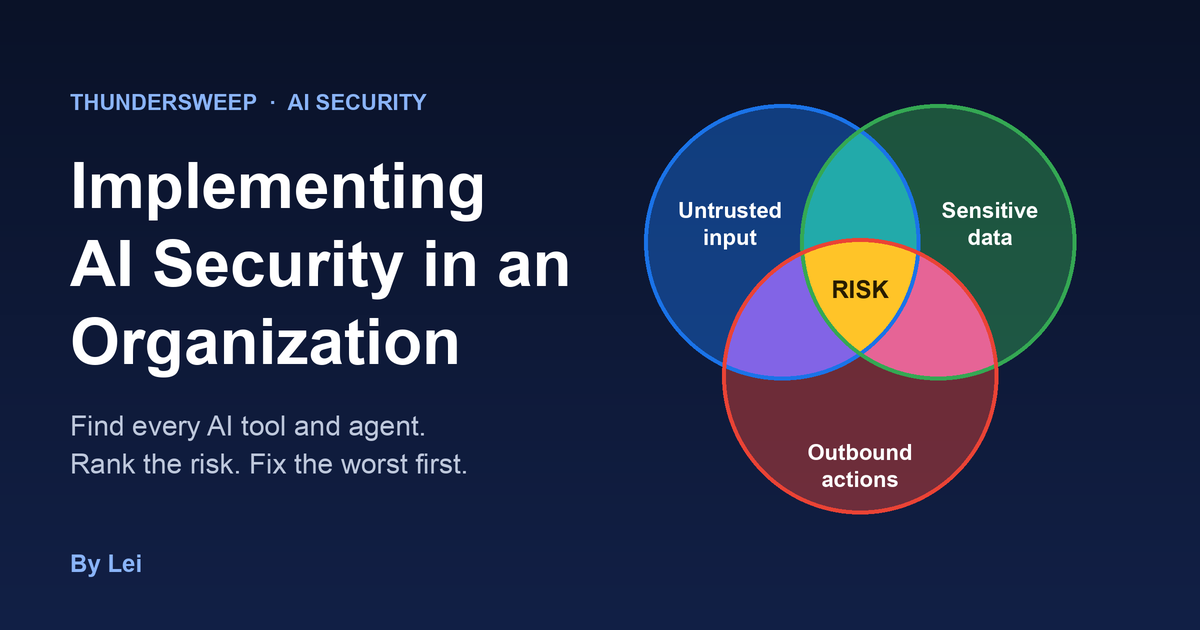
The central idea in this document is simple. An AI system becomes dangerous when it combines three things. It reads text from sources the organization does not control. It can reach sensitive information. And it can take actions or send information out. Security researchers call this combination the lethal trifecta, and each of the three is a leg. When all three legs are present, someone who plants a hidden instruction in the text the system reads can steer it into doing harm. Much of the work in AI security comes down to finding where the three legs meet and removing at least one of them. The rest comes from the fact that agents also make mistakes on their own, with no attacker involved, so the actions they can take need limits of their own.
The document lays out a practical way to do that. First, the organization finds every AI tool and agent in use, including the ones nobody reported. Then it sorts them by risk, using the three legs and a set of seven control points. It fixes the riskiest first, usually by removing one leg, narrowing what the agent may do, or splitting one agent into two. When a team wants to start using a new AI tool, it goes through a short review first. The review is quick for low-risk tools and more thorough for risky ones, so teams can move fast without skipping the checks that matter. Testing repeats whenever something changes. Every agent also sends its activity to central logs, so the organization can see what it does and investigate when something goes wrong. Each agent has a tested way to be switched off, and an incident plan is ready before anyone needs it.
None of this aims to slow the business down. Security that understands why a team wants a tool can almost always find a safe way to deliver it. The goal is to make the safe path the easy one.
The first 90 days aim at three results. The organization knows what AI it has, it knows which of it is risky, and the worst of it is fixed. These are milestones and not months. Automated collection finds and scores at the same time, and a dangerous agent is fixed as soon as it is found, without waiting for the rest of the list. After that the program settles into a steady routine and reports its progress to leadership each quarter. Leaders mainly need to do three things. They name an owner for AI risk, they back the review process so that teams use it and do not work around it, and they make the decisions that only they can make about accepted risk.
How to read this document
Sections 1 to 5 build the program, covering the starting point, the inventory, scoring, fixing, and the review process for new AI tools. Sections 6 to 9 cover the controls for data, approvals, logging, and incidents. Sections 10 and 11 describe how to build and buy AI safely and how to manage its supply chain. Sections 12 to 14 cover testing, the first 90 days, and reporting. A short closing, a list of references, and a glossary at the end summarize the main ideas, point to the published work behind them, and explain the terms.
Threat modeling runs through every section. Each step begins with one question, which is what could go wrong here and who or what could cause it.
1. Start by learning what already exists
An AI security program does not start from zero. Most organizations already run many of the controls that AI needs. They simply were not built with AI in mind. So the first step is to find out what already exists and what it can do for AI, before anyone buys a new tool or writes a new process.
The questions are practical. Which AI platforms has the organization already licensed, and what do their administration consoles allow it to see and switch off? Does the identity provider show which applications people have connected to their work accounts? Does the vulnerability or software scanner detect AI applications? Do the proxy, the secure web gateway, or the cloud access security broker recognize AI services? Is sensitive data already labeled, and does data loss prevention already watch email, uploads, and file sharing? Do the monitoring system and the incident response plan cover the platforms where agents run? Do vendor reviews and change management already apply to software that adds AI features?
Each yes is a control the program can extend instead of building. Each no is a gap, and the gaps show where the first new work should go. In many organizations the answers show that the inventory can begin with tools already in place, that data protection is further along than AI protection, and that logging is the weakest link.
The same review covers people and decisions. Someone may already own AI risk, such as a named executive or a committee, or nobody may. Some decisions may already be made, such as which AI tools are approved or what data may go into them. A written AI policy, if one exists, records those decisions. A new program learns from it but does not start by writing one, because a policy written before the current state is understood tends to promise things the organization cannot yet do.
The rule that matters most comes from this review. A requirement only counts when something in the system enforces it, such as a blocked tool, a required approval, or a scoped permission. A requirement with nothing behind it depends on hope.
2. Build an inventory and keep it current
An organization cannot judge risk it cannot see, so the first practical task is a list of every AI tool and agent in use. Every later step depends on it. Scoring has nothing to score without it, and testing has nothing to test. The list has to include the tools that employees brought in on their own, because those are often the ones with the least oversight and the most surprises.
No single source finds everything, because AI does not live in one place. It lives in five, and each place has its own best sources and its own blind spots. The work goes place by place, and the gaps in one place tell the team where to look in the next.
| Where AI lives | Examples | Best sources | What they miss |
|---|---|---|---|
| People's computers | Coding assistants, command-line agents, desktop apps, browser and editor extensions, locally run models | Vulnerability or software scanner, endpoint searches | Anything that runs only in the browser or the cloud |
| Online AI services | AI chat services, AI features in web tools people sign up for on their own | Identity provider, secure web gateway or cloud access security broker, network logs, procurement and expense records | Personal accounts on personal devices |
| Approved AI platforms | Agents that staff build on a platform the organization licensed | The platform's administration console and its interfaces | Anything outside that platform |
| Business products | Agents and AI features built into products the organization already uses | Product administration settings, audit logs, vendor release notes and contracts | Features the vendor switches on without notice |
| The organization's own code and cloud | Applications and agents the organization builds | Source code, cloud account records, secrets in code | Projects kept in personal accounts |
People's computers
The vulnerability or software scanner is usually the quickest start, since it is already deployed. It shows which AI applications are installed on which machines, with their versions and any known flaws. That gives a first count and a list of hosts. But it cannot see how an application is configured, so it cannot say which servers or tools an agent connects to.
Endpoint searches fill that gap. They find browser and editor extensions, locally run models, and the configuration files that tell an agent which tool servers to use and what it is allowed to do. Those files matter most, because they show what an agent can reach.
A version number does not reveal which model a person is using, because many applications let the user choose a model or connect to any provider. The inventory records the application and treats the model as unknown until the configuration says otherwise.
Online AI services
Most AI use never touches an installed program. It happens in the browser, in services that people sign up for themselves.
Identity provider records add a lot for little effort. They show the third-party applications that employees authorized with their work accounts, including AI tools people signed up for on their own. They also show what each application was allowed to reach, such as mail, files, or calendars, which is exactly the kind of access that makes an AI tool risky.
Secure web gateways and cloud access security brokers, where the organization has them, are often the richest single source. Most of them keep a catalog of AI services with a risk rating for each, and they show which users reach those services and how much data they upload. Some can also tell a personal account from a corporate one on the same service.
Where those tools are missing, network records do a similar job with more effort. DNS, proxy, and firewall logs are noisy, so the work starts from a curated list of known AI service domains, counts traffic by user and volume, and looks for new names. Proxy logs help more than DNS, because they show how much data leaves, and a large upload to an AI service is a stronger signal than a lookup. A proxy sees the destination and the volume even without decrypting the traffic. It needs decryption only to see the content.
Procurement and expense records show who pays for AI tools, which catches paid subscriptions that skipped review.
All of these sources share one blind spot. They see only work accounts, company devices, and traffic that passes through the company's network.
Approved AI platforms
If the organization has an approved AI platform, its administration console lists the agents that people created there. This is the most complete source for that platform, because the platform keeps the list itself. A short list can be read by hand. A long one needs a script that reads each agent's settings through the platform's interfaces and records what it connects to, whether it accepts untrusted input, what data it can retrieve, and what actions it can take, such as sending email or running a program. Those four facts are what the scoring in section 3 (Categorize and score) needs, so it pays to collect them now and not return to every agent later.
This place usually grows fastest, because building an agent on an approved platform takes minutes. It is also the easiest place to automate, so it is where the automated collection described at the end of this section starts.
Business products
Not every agent was created by a team. Many products now ship with agents inside them, or with a gallery of ready-made ones, and some are switched on by default. Nobody installed them, so no scan lists them, and a search for agents will miss many. The answer is to stop looking only for agents and to register at a level the organization can actually see, which is the product.
Every business product already appears in the organization's application list. The register adds an AI profile to each entry. The profile records whether the product has AI features, which ones are switched on, who can use them, what data and systems they can reach, what the vendor logs and makes available, who owns the product's AI settings, and when those settings were last reviewed. Where a feature shows up as a discrete agent, such as one listed in an administration console, it also gets its own entry linked to the product. Where it is only a feature, the product entry carries it.
Several sources fill in the profile. Administration settings show which AI features exist and whether they are on. Audit logs show when someone switched one on. Vendor release notes and roadmaps announce new ones, so a named person reads them on a schedule for each major platform. This matters because a product the organization already approved may now behave differently from what the review assumed. Contracts and renewals are a good moment to ask vendors in writing to list every AI feature and how it uses data.
For a built-in agent, the owner is the business owner of the product, and the vendor is recorded as a dependency, because the vendor can change its behavior with an update. A built-in agent usually acts with the permissions of the person using it, so it can reach whatever that person can reach. That makes the quality of the underlying permissions part of its risk.
Some built-in features will always be missed. The register therefore tracks how complete the product-level picture is, such as how many major products have a reviewed AI profile, so that the gap stays visible and shrinks over time.
The organization's own code and cloud
Teams that build their own AI applications leave traces in code and in the cloud. Source code searches show repositories that import AI libraries, call AI services, or hold AI service keys. Cloud account records show which AI services each account uses and which identities call them. These sources find the agents that engineering teams build, which often have the most direct access to customer data and production systems.
What no system shows
Every source above has a blind spot, and some use never leaves a trace that the organization can see, such as a tool used on a personal phone or a service used once a month. A short, no-penalty survey covers that last gap. It works best when people are told that the goal is to bring tools in and make them safe, because people who expect blame stay quiet.
The order of work
The places do not need equal effort, and they do not all need to be covered at once. A sensible order starts with the sources that are already in place and cover the most people, and then moves to the ones that need new work.
- Identity provider records, the secure web gateway or network logs, and the scanner. These are already deployed and cover the whole workforce, so they give a first picture within days.
- Platform consoles, because agents there grow fastest and can be collected automatically.
- Endpoint searches for agent configuration files, which show what the agents found in step 1 can reach.
- Code and cloud records, and procurement and expense data.
- Product AI profiles, starting with the largest products and the ones that hold the most sensitive data.
- The survey, once the team knows what the systems missed, so it can ask about what is still unknown.
At each step the team compares what the new source found with what the earlier ones showed, and writes down what it still cannot see. That written list of blind spots is part of the inventory, because it tells everyone how complete the picture is.
One register, with a reason for each field
Everything found goes into a single register and not a one-time spreadsheet. Each field is there because a later step needs it.
| Field | Why it is recorded |
|---|---|
| Name and business purpose | Shows what the tool does and whether its value justifies its risk |
| Where it lives, and which source found it | Shows how it was found and how to find it again |
| Owner | Names who answers questions, makes fixes, and writes the guide |
| Who can use it | Sets how many people a problem could reach |
| Untrusted input it reads | Shows the first of the three legs and the main way an attacker reaches it |
| Data it touches | Shows the second leg and sets the size of a possible leak |
| What it connects to | Shows how far a problem could spread |
| Identity it runs as | Shows what the agent can do on its own authority |
| Actions it can take | Shows the third leg and whether a fooled agent can cause harm |
| Model, and whether the version is fixed | Shows whether behavior can change without warning |
| How it can be switched off, and by whom | Makes containment fast during an incident |
| Whether its logs are verified | Shows whether its activity can actually be seen |
| A link to its guide | Points people to the owner's description of how the agent is built and used |
| Risk tier | Sets the order of work and the amount of testing |
Keeping it current
Collection is automated and repeats on a schedule, because AI use changes week to week and a list that is a month old is already wrong. A small collector can read the platform interfaces, the identity provider, and the endpoint searches every day, fill in the fields it can see, and flag what is new or changed. When a source finds something new or a setting changes, the register records it and re-scores the item, as section 3 (Categorize and score) describes. People then spend their time only on the items that score high, and not on keeping the list up to date.
3. Categorize and score
With a register in hand, the next step is sorting it by risk, so that effort goes to the right place. This document uses one model with two layers. The first layer, exposure, asks what could go wrong if the agent were fooled or made a mistake. The second layer, control strength, asks how well the organization's controls stop that from happening. Risk teams will recognize the shape. Exposure is the inherent risk, control strength is how effective the controls are, and the tier that comes out of both is the residual risk.
The two layers stay separate on purpose. An agent with all three legs and strong controls can be safer than a two-leg agent with no controls at all, so one added-up score would mislead. But they are not two unrelated checklists either. Each control in the second layer guards a specific path in the first, and the end of this section maps them together.
Layer one: exposure, what could go wrong
The lethal trifecta
Exposure starts with the lethal trifecta, a term popularized by the security researcher Simon Willison. It names three capabilities that make an AI agent dangerous when they combine. Each one is a leg.
The first leg is untrusted input, meaning text from people or sources the organization does not control, such as an email from outside the organization or from a sender who is not on an approved list, a public web page, a customer message, or a document from an outside source. What counts as untrusted depends on who is able to write to the source. A message from a verified internal sender is treated differently from one that anyone on the internet could send. The second leg is access to sensitive data, such as customer records, company proprietary data, internal documents, or credentials. The third leg is the ability to act or send data out, such as sending a message, changing a record, or running a command.
For data theft, any one leg alone is manageable. An agent that reads untrusted text but can reach nothing sensitive and take no action can at most give a wrong answer. The danger comes from the combination. Models cannot reliably tell the instructions they should follow from the text they are only meant to read. So a hidden instruction placed in untrusted input can make an agent gather the sensitive data it can reach and send it out. That is why the trifecta is the first question to ask about any agent, and why removing even one leg breaks the path to data theft. Meta's "Agents Rule of Two" reaches a similar conclusion from the same three properties.
The action leg is wider than it looks. An agent with no tool for sending anything can still leak data if its answer contains a link or an image. When the user's screen loads that image, the address goes out, and an attacker can hide stolen data in the address. Researchers showed this in a major enterprise assistant in 2025, with an attack that needed no click from the user, and several times again in 2026. In one 2026 case, switching off an assistant's web search did not stop data from leaving, because the tool it used to check links was a separate feature. So any output that a screen renders counts as a way out, unless links and images are limited to approved destinations.
Paths that need fewer legs
The trifecta describes data theft. Two other paths need fewer legs. An agent that reads untrusted input and can take a damaging action, such as deleting records or moving money, can be steered into harm without touching any sensitive data. And an agent can cause harm with no attacker at all, simply by making a mistake. So exposure looks at how serious the actions are, and not only at how many legs there are.
Systems made of several agents
The legs are counted across the whole system and not agent by agent. One agent may read outside content, another may hold sensitive data, and a third may send messages. An orchestrating agent that connects them gives the system all three legs, even though no single agent has them. Section 10 (Building AI safely, reference patterns) describes this in more detail.
Rating exposure
Exposure is rated high, medium, or low. It draws on four facts that the register already holds: how many legs the agent has, how sensitive its data is, how serious and how reversible its actions are, and how many people can use it or reach it.
| Exposure | Typical profile |
|---|---|
| High | All three legs. Or untrusted input together with an action that is hard to undo, such as deleting, paying, or changing access. Or regulated data, or an agent that outside customers can reach |
| Medium | Two legs without the conditions above. Or one leg with sensitive data or a wide audience |
| Low | One leg or none, no sensitive data, and only reversible actions |
The organization can tune the profiles, but the principle stays. Exposure describes what the agent is able to do, whether or not anyone has tried to stop it. These facts come from the agent's settings, so the inventory collector can set them without a person reading each agent.
Layer two: control strength, how well the gates hold
The seven gates
The second layer looks at seven control points, which this document calls gates. Each gate is a place where a control can stop harm, and each can be held well or badly.
| Gate | What it covers | What a strong control looks like |
|---|---|---|
| Identity | Who or what the agent acts as | Delegated, scoped access on behalf of the user, or its own identity with narrow rights, and never a person's stored password or session |
| Data | What it can reach, including what it remembers | Access limited to what the task needs and filtered by the user's own rights, with memory off or reviewed |
| Input | How untrusted text is handled | Untrusted text treated as data, sources limited, and hidden-instruction tests passed |
| Model | Which model it uses | The version is fixed or tracked, and a change triggers a retest |
| Action | What it can do | Narrow tools, limits the system enforces, and approval for critical actions |
| Output | How its results are checked | Structural checks on what leaves, with no unapproved links, images, or hidden content |
| Detection | Whether its activity is logged and watched | Logs verified to arrive, alerts tested, and a kill switch tested |
Identity and data work together. Many agents, and most agents built into products, act on behalf of the person using them. Others run as a service with their own identity. In either case, what the agent can do should be the overlap of the agent's own rights and the user's rights, and never more than either one.
Memory belongs under data. An agent that remembers earlier conversations can also remember a hidden instruction, so one poisoned message can affect every later session. Memory stays off unless the task needs it, and what the agent stores can be reviewed and cleared.
The model gate needs care. A newer model version may resist common attacks better, but a newer version is not a control, and a version change can alter behavior without warning. An agent built on a model provider's interface can usually name a dated version, but providers retire old versions on a schedule, so a fixed version lasts months and not years. An agent inside a product the organization buys usually runs on whatever model the vendor chooses. For those agents the register records the model as vendor-managed. A named person watches the vendor's change notices, and a notice of a model change triggers a retest. A vendor-managed model is scored on how well the organization tracks changes, not penalized for a setting that no customer has.
Scoring a gate
Each gate gets a score on a short scale. A gate scores 0 when there is no control, 1 when the control depends on an instruction or on people remembering, 2 when the system enforces it but nobody has tested it, and 3 when the system enforces it and it has been tested.
Not all gates are equal. Identity, data, action, and detection are enforced by the system. Input handling and the model are probabilistic, because they can be talked around, and a permission cannot. Output sits in between. A structural check, such as allowing links only to approved domains, holds every time. A check for sensitive content depends on patterns and can miss data that has been reworded or encoded. So the enforced gates carry more weight, and a strong score on a probabilistic gate never makes up for a weak enforced one.
Summarizing control strength
The gate scores are summarized as strong, moderate, or weak. The summary looks at the weakest relevant gate and not at the average, because an attacker only needs one gap.
| Control strength | What it means |
|---|---|
| Strong | Identity, and every enforced gate that guards one of the agent's legs, scores 3, which means enforced and tested |
| Moderate | Those gates all score at least 2, which means enforced, but some have not been tested yet |
| Weak | Any of those gates scores 0 or 1 |
The probabilistic gates adjust the result in one direction only. A weak input or model gate moves a strong agent down to moderate, but a strong input or model gate never lifts a weak agent up.
Bringing the layers together
Each leg has its gates
The two layers connect through a simple map. Each leg is guarded by specific gates, and three gates apply to every leg.
| Leg in layer one | Gates in layer two that guard it |
|---|---|
| Untrusted input | Input |
| Sensitive data | Data |
| Actions or a way out | Action and Output |
| Every leg | Identity, which bounds what the agent can reach and do. Model, which shapes how it behaves. Detection, which shows when something goes wrong |
The map explains which gates matter for a given agent. A gate that guards a leg the agent does not have matters less. An agent with no action leg is not pushed into a higher tier because its action gate is untested. A gate that guards a leg the agent does have matters a great deal. An agent that can send email and has a weak action gate is exposed no matter how good its logging is. The map also shows the two ways to lower risk, which section 4 (Reduce the risk, starting with the highest) uses. One is to remove a leg in layer one. The other is to strengthen the gates that guard it in layer two. Removing a leg is usually stronger, because it takes away a possibility and does not try to catch an attack.
The tier
Exposure and control strength together give the tier, which is the residual risk.
| Weak controls | Moderate controls | Strong controls | |
|---|---|---|---|
| High exposure | Critical | High | Medium |
| Medium exposure | High | Medium | Low |
| Low exposure | Medium | Low | Low |
The critical tier is also called the top tier in later sections. A three-leg agent with strong controls lands in the medium tier, while a medium-exposure agent with only two legs but weak controls lands in the high tier. The agent with more legs ends up in the lower tier, which is the point the two layers exist to make.
The override rule
One rule crosses both layers and overrides the grid. If an agent has all three legs in layer one, and its action gate scores below 2 in layer two, the register places it in the critical tier automatically. A score below 2 means there is no enforced limit, approval, or narrow permission on its actions. This happens whatever the other gate scores would say. No person votes on it, because the scoring logic applies it every time.
When every gate has been scored, the grid usually reaches the same result on its own. The rule exists so that this one combination never depends on how the rest of the scoring is tuned, or on whether a person has scored the gates yet. An agent might have excellent logging, a narrow identity, and tight data access, and still look acceptable under a tuned scoring scheme, even though nothing stops it from doing harm once it is fooled. An agent leaves the critical tier only when someone fixes the cause, for example by adding an enforced limit or an approval on its actions, or when the risk owner records a time-limited acceptance of the risk.
Scoring in two stages
Scoring every gate on every agent does not scale. An organization can have hundreds of agents, and the number grows every week. So the model runs in two stages that follow its two layers.
The first stage covers every agent and needs no person. The inventory collector reads each agent's settings, sets its legs and its exposure, and scores the gates it can see from those settings, such as whether sign-in is required, how widely the agent is shared, and which connectors and actions it has. That is enough to apply the override rule and to sort everything.
The second stage adds human judgment where exposure is high. High-exposure agents get every gate scored, with the owner's input and the tests in section 12 (Testing and red teaming) behind each score. Medium-exposure agents get the gates that matter most for them, which are identity, data, and action, checked by a person. Low-exposure agents are not scored one by one. They are covered by the platform's default settings, which are scored once for the whole platform.
Keeping the score current
The register re-scores an agent automatically whenever something changes, such as a new tool, new sharing, a new data source, a change to sign-in, or a model change. A change that adds a leg raises exposure at once. A change that weakens a gate lowers control strength at once. Either one can move the agent into a higher tier and into the review queue.
What each tier means
The tier decides how much attention an agent gets. Critical agents are fixed first, as section 4 (Reduce the risk, starting with the highest) describes, and receive the full testing in section 12 (Testing and red teaming). High agents follow, with a normal level of testing. Medium agents get the minimum controls and a periodic review, with a short test when something changes. Low agents get the minimum controls and the periodic recheck. The tier also feeds the review process in section 5 (A front door for new AI), so a new request is placed in the right lane from the start.
4. Reduce the risk, starting with the highest
Reducing the risk starts with the highest-ranked agents, and it works best one agent at a time. For each one the routine is the same. Learn what the agent does for the business, find its weakest gate, choose the cheapest fix that brings the risk to an acceptable level, apply it, and then retest and update the register. Agents at the top of the list usually have all three legs, so the work is to remove or weaken at least one of them.
Understand the agent before changing it
The first conversation is with the owner. It covers what the agent is for, what the business gets from it, and which of its access it really uses. Agents very often hold far more access than they use. They connect to systems they never call, they can read data they never open, and they carry tools nobody needs. The agent's logs show what it actually did over the past few weeks, and comparing that with what it is allowed to do usually points straight at the cheapest fixes. A useful question for the owner is whether anyone would notice if a given permission disappeared. If nobody would notice, the permission can be removed.
Choose the fix, cheapest first
The options run from cheapest to most expensive, and most agents need more than one of them.
| Option | What it means in practice | Use it when |
|---|---|---|
| Remove a leg | Make the agent read-only or draft-only, take sensitive data out of its reach, or limit it to approved sources and senders | The business value does not depend on that leg |
| Narrow the permissions | Give the agent its own identity or scoped delegated access, limit it to the records and operations it needs, shorten how long its credentials last, and remove unused tools | Almost always, even when other fixes are also used |
| Make actions reversible | Replace sends with drafts, deletes with soft deletes, and removals with quarantine | The action is needed often and a mistake would be costly |
| Add approval for critical actions | Route only the hard-to-undo actions to a person or a tool-based decision, as section 7 (Human approval, used sparingly and made real) describes | The action is needed and cannot be made reversible |
| Split into two agents | Separate the agent that reads untrusted input from the agent that holds the data, with a structural check between them | All three legs are truly needed for the function |
| Add detection and a kill switch | Log the agent's activity, alert on unusual behavior, and keep a tested way to turn it off | At every level, and especially where other fixes are limited |
| Retire the agent | Switch it off and remove its access | The value does not justify the risk, or no one owns it |
Removing a leg is the strongest move, because it takes away a possibility and does not try to catch an attack. A support assistant that sends replies automatically can become one that writes drafts for a person to send. That removes the action leg at almost no cost, and the people who read the drafts usually welcome the check. In the same way, an assistant that searches a whole document library can be limited to the one folder it needs, which removes most of the sensitive data.
Narrowing permissions comes next and applies almost everywhere. The agent runs under its own identity, or under delegated access scoped down from the user's, and never with a person's stored password or session. It can see only the customer, case, or folder in front of it and not the whole system. Its credentials expire quickly, and anything it does not use is removed.
Reversibility is often overlooked, and it cuts down the number of approvals a program needs. If a mistake can be undone, the action can run automatically. If it cannot, it becomes a candidate for approval.
Splitting into two agents is the heaviest option, so it belongs to the cases where the business function really needs all three legs. One agent reads the untrusted input and produces a structured request that never touches sensitive data. A check that is not itself a model validates the request. A second agent, which holds the data, receives only what passed.
A worked example
Take a support assistant that reads customer emails, looks up account records, and replies to customers while updating the case system. The emails are untrusted input, the account records are sensitive data, and the replies and updates are actions, so it has all three legs.
The conversation with the owner shows that the assistant only ever needs the account of the customer who wrote in, and that it only reads the open case. The first fix removes the action leg by turning replies into drafts that a person sends. The second narrows access, so the assistant runs under its own identity, can look up only the customer on the case and not the whole customer table, and holds credentials that expire quickly. The third makes case updates reversible by writing them to a staging field that a person confirms. Those three steps take days and not weeks, and they remove most of the danger.
If the business insists on automatic sending, the design is split. The first agent reads the email and outputs fixed fields, such as a customer identifier, a category from a short list, and a short summary. The check confirms the fields are valid. The second agent drafts the reply from those fields and the account data, and any recipient other than the original sender needs approval. The three legs no longer sit in one place.
How to choose
A few questions settle most decisions. Which leg could the business live without? What is the worst thing the agent could do if it were fooled today? Could that be undone? And is there a control the system enforces, and not just an instruction to the model, standing between the agent and that harm? If the last answer is no, the next fix should add one. A control the system enforces is worth more than one that depends on the model behaving well, because a permission holds every time and a model's judgment does not.
What a structural check can and cannot do
A structural check validates shape and not intent. It can enforce a fixed set of fields, allowed values, length limits, and a list of permitted destinations. It cannot judge whether free text is hostile, because that would require reading meaning, which is what a model does and a check does not. So free-text fields are kept to a minimum, and the ones that remain are contained. The receiving agent has no write access, and a person sees the text next to any action it proposes.
Prove the fix and record it
Every fix ends with a retest. The test repeats the attack that exposed the gap and runs the regular checks described in section 12 (Testing and red teaming). The register is then updated with the new legs and controls, and the agent is scored again. The owner hears what changed and why, and a date is set for the next recheck, so the fix does not quietly erode.
Sometimes the business cannot give up any leg and the split design is not practical yet. In that case the organization records an explicit decision to accept the remaining risk, with an expiry date that the system enforces, and it applies the narrow identity, the approval at the edge, the logging, and the kill switch in the meantime.
Lower-risk agents
Lower-risk agents still get the minimum controls, which means an owner, a guide, logging, and a periodic recheck. They simply wait for their turn after the first queue.
5. A front door for new AI
Reducing risk in existing tools is only half the work. If new high-risk tools keep arriving unreviewed, the list refills as fast as it empties. The organization therefore sets up one simple way for teams to request a new AI tool or feature. The process starts with the business reason. Security that understands why a team wants a tool can usually find a safe way to deliver it.
What a request asks
The request form is short, so that a team can fill it in within minutes. It asks what the tool is, why it is needed, who will use it, what untrusted input it reads, what data it touches, what it connects to, and what actions it takes. These are the same facts the register records, so the answers move straight into it. The same scoring from section 3 (Categorize and score) places the request in a tier immediately.
Three lanes
The tier sends the request to one of three lanes. Low goes to the fast lane, medium goes to the normal lane, and high and critical go to the full review.
| Lane | When it applies | What happens |
|---|---|---|
| Fast | Low risk, or a setup that is already pre-approved | An answer within a day, with no extra review |
| Normal | Medium risk | A short review of the data, the connections, and the configuration, with an answer within a few days |
| Full review | High or critical risk | A threat model, the test plan from section 12 (Testing and red teaming), and the owner and security working together from the start |
A team that turns on an approved assistant for public information, with no sensitive data and no actions, takes the fast lane. A team that wants an assistant to search one department's internal documents takes the normal lane. A team that wants an agent to act on customer accounts takes the full review, which starts early and runs alongside development so that the launch date does not move. The timings are proposals, and each organization adjusts them to its own pace.
Configure to the organization's standards
Vendors ship products with open settings so that the product works for any customer. A tool has to be configured to meet the organization's security standards before anyone uses it, and some tools need custom changes to match them. Secure-by-default templates for common platforms give teams a safe place to start, and they are also what makes the fast lane possible. The approved path has to be faster than the unapproved one, because people take the quicker route.
Controlling agents that come with products
The controls for built-in agents do not depend on finding every one, because most of them work at the level of the product, the user's permissions, and the data. Five controls carry most of the weight.
The first is a stance of default off. Where a vendor offers a tenant-wide setting, new AI features stay disabled until someone reviews them, and a feature is then enabled for a defined group and not for everyone. Features that are not needed, such as web search, connections to other systems, and the option for other agents to call the agent, stay off.
The second is fixing the permissions underneath. Because a built-in agent acts with each user's permissions, it surfaces anything its user can open. Cleaning up oversharing, removing standing access that nobody needs, and labeling sensitive data reduce the risk of every built-in agent at once, including the ones nobody has found yet. This is the largest single control.
The third is the set of protections that apply whether or not the organization knows about a particular agent. Data loss prevention, classification labels, and network controls cover the agents that were missed. The fourth is logging at the product and tenant level, using the product's audit logs and the identity provider's logs. The review checks what the vendor makes available, and if a built-in agent cannot be logged, that is recorded as a finding.
The fifth is vendor management. Contracts ask for notice before new AI features are turned on, clear statements about data use and retention, access to logs, and the ability to disable features. A named person reviews the release notes for each major platform, and a vendor update that adds or changes an agent feature triggers a fresh review. A ready-made agent from a gallery or from another team is treated as third-party software and reviewed before use.
After approval
The register entry is created at approval, so the inventory stays current without extra work, and the owner writes the agent's guide at the same point. Approvals expire. A new model version, a new data source, or a new connection triggers a fresh review, and so does a wider audience, for example a move from a pilot group to everyone.
When older risks are still open
Sometimes old high risks remain unresolved and a new tool would add exposure to the same data and systems. In that case the risk owner makes an explicit decision with conditions, so the backlog does not quietly stall everything. Throughout, the security team talks with the business and support teams about what an incident would cost and whether the risk can be lowered without losing the function.
6. Data, what may go into AI
Data is the second leg of the lethal trifecta. It is also the leg that organizations already know how to protect, so this section builds on existing data protection work and does not replace it. The goal is to decide, for each kind of data and each kind of AI tool, whether the data may go in, and then to make the system enforce that decision.
Classify the data
Rules about data only work when the data has a class. Most organizations already use a scheme with levels such as public, internal, confidential, and regulated. Public data is meant to be seen by anyone. Internal data is meant for staff and does little harm if it leaks. Confidential data, such as company proprietary data, financial results, and contracts, would cause real damage if it leaked. Regulated data is covered by law or contract, and it includes customer identity, payment card data, and financial and health records. Secrets, such as passwords, keys, and tokens, sit outside the scheme because they never belong in an AI tool at all.
An organization without a scheme can start with three levels and refine them later. The label matters most when it is attached to the data itself, because then tools can read it and enforce the rule without a person deciding each time.
Classify the tools
Tools need classes too. An approved enterprise tool is covered by a signed agreement. A tool approved with restrictions has been reviewed, but only for limited use, for example public data only. A personal or consumer tool is one that an employee signs up for with a personal account, and an unknown tool is one that nobody has reviewed.
The agreement is what separates the first class from the rest. For an AI tool, a good agreement says that company data is not used to train the vendor's models. It states how long prompts and outputs are kept and how they can be deleted. It names the vendor's sub-processors and the regions where data is stored, requires notice of a breach, and gives the organization access to the logs it needs.
The grid
Putting the two together gives a simple grid. Each organization adjusts the cells to its own risk, but the shape should stay.
| Approved enterprise tool | Approved with restrictions | Personal or consumer tool | Unknown tool | |
|---|---|---|---|---|
| Public | Allowed | Allowed | Allowed | Not allowed |
| Internal | Allowed | Limited use | Not allowed | Not allowed |
| Confidential | Allowed for approved use cases | Not allowed | Not allowed | Not allowed |
| Regulated | Only after a specific review | Not allowed | Not allowed | Not allowed |
| Secrets | Never | Never | Never | Never |
Secrets never go into AI tools
No business case justifies putting a secret into an AI tool. A secret placed in a prompt, in a document the assistant reads, or in a file in a repository can come back out in an answer, appear in a log, or reach the vendor. Several controls reduce the chance. Secret scanning runs on prompts and uploads where the tool allows it, and on the repositories and documents that feed assistants. Secrets live in a secrets manager and are handed to systems only at the moment of use. Credentials are short-lived, so a leaked one stops working soon. And a defined response exists for the day one is exposed, which is to rotate it at once and not to wait and see.
The AI sees only what the user may see
The contract covers the vendor. It does not decide who inside the company can read what. An assistant that searches internal documents will show a user anything that the user's account can open, including files that were shared too widely years ago. So the cleanup of oversharing starts before an assistant is switched on. No large organization finishes it first, so the work is ordered. It starts with the broadest sharing settings and the most sensitive sites. Sites that have not been cleaned yet are kept out of the assistant's reach. The assistant starts with a pilot group, and the cleanup continues in parallel as access widens.
The assistant itself should not run on a powerful shared account that can read everything. The application passes the verified identity of the person asking, and the data layer returns only what that person may see. This closes a gap that otherwise stays open. A shared account with wide access will answer any employee about any customer, because the account cannot tell who is asking.
External senders and other untrusted sources
Where outside parties can send input to an agent, the system restricts them to a list of known senders. The list names organizations or domains. It never uses wildcards for public email services, because anyone can create an account there. Being on the list narrows who can send. It does not make the content trustworthy, since a known sender can forward someone else's message or have a compromised account, so the other controls still apply.
Redact before indexing
Text that goes into a vector database or another search index is hard to find and remove later. A card number or a national identifier that is embedded once may appear in answers for years, and it can survive a deletion request. So the pipeline that feeds the index removes or masks regulated fields first. It keeps a record of which sources fed the index and supports removing one source cleanly. Logs of prompts and answers need the same care, because they hold whatever users typed.
The index itself is sensitive data. Embeddings look like lists of numbers, but research has shown that much of the original text can be recovered from them. So a vector database carries the classification of the most sensitive source that feeds it, with the same access control and retention rules, and it is never treated as anonymized.
Who decides and how it is enforced
The data owners decide what each class may do. Privacy, legal, and the security leader set the policy and standards that record those decisions. The system enforces them with classification labels, data loss prevention on prompts and uploads, blocking of unapproved tools, secret scanning, redaction before indexing, and per-user permissions at retrieval. People still carry the training, the judgment in gray cases, and the reporting of mistakes. That part is kept small, because it is the weaker one.
Prefer the smallest data path
A claim status or an account balance is an exact lookup through an existing interface, and it does not need a search index. A search index fits large bodies of text that people search by meaning. Choosing the exact lookup removes the sensitive text from the AI system altogether, which is the best protection there is.
7. Human approval, used sparingly and made real
A person approving every action an agent takes sounds safe. In practice it fails, and it fails in a way that is worse than having no control. This section explains why, and how to build approval so that it works.
Why approval fails when overused
When people face a constant stream of approval requests, they stop reading and approve everything. The control becomes a ritual. It also gives the organization a false belief that a check exists, so nobody looks for a better one. The lesson is to reserve approval for the few actions that matter, and to design the decision so that it is informed. Everything else should run on its own inside enforced limits.
Decide what is critical
The list of actions that need a decision should be short, and it should follow clear criteria. The usual ones are shown below.
| Kind of action | Examples | Why it needs a decision |
|---|---|---|
| Hard to undo | Permanent deletion, overwriting data, restoring over live data | A mistake cannot be reversed |
| Leaves the organization | Sending data or messages to an external recipient who is not on the allowed list, exporting data in bulk | Data cannot be taken back once it is out |
| Moves value | Payments, refunds, changes to account details | It causes direct financial harm |
| Changes access | New permissions, new credentials, new connections | It gives a future attacker more reach |
| Changes production | Deployments and configuration changes on live systems | It can cause outages or open holes |
Everything that is reversible and low risk runs automatically within its limits. The list stays short on purpose, because each addition adds to the stream that causes fatigue.
Let tools make the decision
Each action on the critical list first goes through automated checks that apply fixed logic and existing security tools. A natural place for these checks is a gateway that every tool call passes through, with the rules written as policy code, so that one set of rules covers many agents. The system checks the recipient against the allowed list. It runs the content through data loss prevention. It looks at context from the monitoring and endpoint tools, such as whether the host is healthy and whether the activity fits the user's normal pattern. The result is one of three outcomes. The action is allowed automatically, which includes an action that matches a pinned approval as described below, or it is denied automatically, or it goes to a person for the narrow set of unclear cases.
Three examples show the difference. An agent that tries to email a file to an external address fails the allowed-list check, and data loss prevention finds regulated data in the attachment, so the action is denied automatically with the reasons recorded. An agent that sends a reply to the customer who wrote in passes both checks and the recipient matches the case, so it is allowed automatically. An agent that wants to send a non-sensitive document to a new external partner passes the content check but fails the allowed-list check, so it goes to a person, who receives the reasons the tools gave and not a bare request. Every decision is logged with its reasons.
Who approves
The approver is a role and not an individual. The request goes to a queue that the on-call owner or the data owner watches. It carries a time limit, and the default when nobody responds is to deny. The person who asked for the action cannot approve it. The highest-risk actions need two people. Approvers rotate and have a manageable number of requests per day, because a person working through a flood of requests will approve without reading.
Show the real action
The approval screen has to show what will actually happen, as the system derives it. Suppose an agent labels a command "clean up temporary files" while the command deletes a project directory. If the screen shows the agent's label, the approver will accept it. If the screen shows the exact command and the exact target, the approver can see the difference. The same applies to recipients, amounts, and records, and the screen should highlight what differs from the usual. An agent that can supply the label can mislabel a harmful action as harmless, so the label must never come from the agent.
Pin the approval
An approval covers one specific thing. It applies to the exact action that the approver saw, in the exact configuration of the agent that asked for it, and it lasts only as long as the approver set. It never turns into a general permission. This stops people from approving the same thing again and again, and it stops an old decision from covering something new.
Three forms are useful. A one-time approval covers a single action and is used up when the action runs. A session approval covers repeats of the same action inside one session, up to a stated limit, and it ends when the session ends. A standing approval covers a defined pattern, such as sending one named report to one internal address every week, and it is pinned to the agent's current version and configuration. Where the vendor manages the model, the pin covers the agent's tools and instructions, and a vendor notice of a model change ends it. A standing approval is created through the organization's change process, with a named owner and an expiry date, and it is reviewed on a schedule.
The approval record is itself data that needs protecting. If an approved command contained a password or key, a record that saves the command word for word now holds that secret. So approval records never store secrets, and they are covered by secret scanning like any other file.
What gets pinned matters. The record names the action and its allowed parameters, such as the exact command, the recipient, or the amount range. It names the version of the agent, including its model version, its tools, and its instructions. And it names the scope, which is the session or the period. If any of these changes, the approval no longer applies, and the action goes back through the same process. A new model version, a new tool, a changed instruction, a recipient outside the approved set, or a larger amount all count as changes.
When an action matches a pinned approval exactly, it proceeds without human interaction. The system logs that it did and which approval covered it. This is how the program keeps the number of requests low without lowering the bar. The pin has to be narrow. An approval for one command in one folder can be pinned. An approval for everything under a home folder cannot, and tools that offer permanent blanket approvals are limited by enforced settings so that nobody can create one. The owner or security operations can revoke a standing approval at any time, and the kill switch revokes them all.
Make actions reversible
Many actions become safe to run automatically once they can be undone. Soft deletes replace permanent deletes, quarantine replaces removal, drafts replace sends, and staging comes before production. A short delay on outgoing messages, with a way to recall them, gives people a window to catch mistakes. Backups that have been tested make restores safe. Each action made reversible is one fewer approval, so reversibility is one of the best ways to keep the stream small.
Measure the approvals
Approvals are a control, so they are measured like one. The program tracks how many requests each approver sees per day, how long a decision takes, the share that are approved, the share denied, the share that the tools decided automatically, and the share covered by pinned approvals, along with how often a pin expires or is broken by a change. A rate near 100 percent approval with decisions taking seconds shows that the control is a ritual, and the fix is to turn it into an automatic check or narrow it to the cases that really need a person. A very high volume shows that the critical list is too wide. A monthly review of these numbers keeps the control honest.
8. Minimum controls for every agent
Three controls apply to every agent regardless of its risk tier. Its owner keeps a guide for it, it has a way to be switched off, and it logs its activity. For low-tier agents built on a shared platform, these can come from the platform itself, through the register entry, a platform-wide switch, and the platform's logs. They are cheap, and they matter most on the day something goes wrong. Without them, scoring, testing, and incident response all lose their footing.
The agent guide
Every agent has its own guide, written and maintained by its owner. The guide sits below the organization's policy, standards, and procedures. Those documents stay general. The guide holds the detail that they leave out, such as how the agent is built and how it is run. Writing it is a habit of good engineering. The owner records what was built and why, so that others can understand, operate, and investigate the agent, and keeps the guide current as the agent changes, which matters when AI changes fast. A simple agent needs a page or two, and a complex one needs more. Organizations with hundreds of small agents built by staff on a low-code platform cannot write a guide for each one. For low-tier agents the register entry serves as the guide, filled in from the platform's own settings, and the platform-level controls in section 5 (A front door for new AI) carry most of the protection. The full guide is required for the top two tiers.
| Topic | What it holds |
|---|---|
| Purpose | What the agent is for and what it is not for |
| Architecture | A diagram and a short description of the parts, where the agent runs, what it connects to, and how data flows |
| Users | Who may use it and who may not |
| Data and tools | Which data and tools it may use, which it must not, and the identity it runs as |
| Configuration | The settings that matter for security, such as permissions, limits, the model version, and logging |
| Operation | How to run, monitor, and update it |
| Safe use | What users should and should not do with it, for example never to paste secrets |
| Known limits | Where it tends to be wrong or unreliable |
| Contacts | Who owns it and who to call when something looks wrong |
| Switching it off | How to disable it and who may do so |
| Change history | What changed, when, and why |
The owner reviews the guide whenever the agent changes, for example a new tool, a new data source, a new model version, or a wider audience. The owner also reviews it on a regular schedule, so that it does not drift from the agent it describes, and the register shows when the guide was last updated. The register links to it, so anyone who finds the agent can find the guide, and an investigator can learn how the agent works without waiting for the owner.
The kill switch
A kill switch is a tested way to stop an agent quickly. It comes in levels. The lightest pauses the agent so it takes no new tasks. The next cuts its tools, so it can still respond but cannot act. The strongest revokes its credentials and its access to data. Each level is documented, with the people allowed to use it and a deputy for each, since a switch that only one person can use fails when that person is away.
For high-risk agents the organization sets a target time to disable, such as a few minutes, and rehearses the switch. Testing matters because switches fail in ordinary ways. The switch may depend on the same credentials the agent uses, it may live in a console few people can open, or it may stop the first agent in a chain and leave the sub-agents running. For agents built into products, the switch is usually a tenant setting or a feature toggle, and it should be written down before it is needed. The register records the date of the last test and the result.
Logging
Every agent logs to the central monitoring system, whatever its risk. The minimum set is shown below, and each item is there because an investigation needs it.
| Item | Why it is logged |
|---|---|
| The signed-in user | To know who used the agent |
| Time | To order events and to match them with other systems |
| The agent and its version | To know which agent acted and in which configuration |
| Tools called, with their parameters | To see what the agent actually did |
| Sources retrieved | To see what data the agent read |
| Actions taken and any approvals | To see what changed and who allowed it |
| Errors and denials | To spot probing and broken controls |
| Configuration changes | To see who changed the agent and when |
| A shared identifier across a chain of agents | To follow one task through several agents |
Higher tiers add the full content of prompts and responses, which makes investigation far easier but also puts sensitive text in the logs. So the logs themselves are protected. Few people can read them, they have a retention period, and sensitive fields are redacted where possible.
For agents the organization builds itself, the OpenTelemetry conventions for generative AI give a standard shape for these records, so that logs from different agents can be read the same way. For agents inside products, the organization takes what the vendor provides, and a gap is recorded as a finding.
The organization also verifies that the logs actually arrive. A log source that quietly stops sending, or never recorded certain events, comes to light only through testing. A tester makes a change and looks for it. The register records the date of the last event seen for each source, and an alert fires when an active agent goes silent for too long.
Detection
Logs only help if someone watches them. Security operations builds detections on the minimum log set, and each detection is tested before it is trusted. A few signals cover much of the ground.
| Signal | Why it matters |
|---|---|
| A rise in denied actions | The agent or a user may be probing the limits |
| Retrieval volume far above normal | Someone may be collecting data in bulk |
| A new outbound destination | Data may be heading somewhere new |
| Use at unusual hours or from unusual places | An account may be compromised |
| A change to an agent's permissions or tools | The agent may have been given more power |
| The kill switch being used | An incident may be under way |
| Repeated requests for the same approval | Someone may be trying to wear down the approvers |
Thresholds are tuned by tier, so critical agents raise alerts sooner than low-risk ones. Each alert has an owner and a defined response, and the team reviews false positives regularly so that people keep trusting the alerts.
9. Incident response for AI
The organization's normal incident response plan and procedures still apply, with their steps to identify, contain, eradicate, recover, and learn. This section covers what changes for AI, and what must be ready before an incident happens.
What counts as an AI incident
An AI incident is any event where an AI system exposes data, acts against its owner's intent, or causes harm. Common forms include data exposed through an agent's answer, an agent acting on a hidden instruction, a poisoned document or ticket in a source the agent reads, an exposed credential or key, an unapproved agent discovered handling sensitive data, a runaway agent or a sudden jump in cost, and false or harmful output sent to customers. Severity depends on the type of data involved, who saw it, whether the agent took actions, and whether outside parties were affected.
What to prepare before an incident
Most of the work happens before anything goes wrong. The preparation covers the following points.
| Preparation | Why it matters |
|---|---|
| A tested kill switch for each agent | Containment takes minutes and not hours |
| Logs that answer what happened, to whom, and how much | Scope cannot be judged without them |
| A separate identity for each agent | The possible damage is bounded by its permissions |
| A list of secrets each agent could have seen | They can be rotated at once |
| Named roles and contacts across security operations, legal, privacy, communications, and the product owner | Nobody wastes time finding who decides |
| Vendor contacts and contract obligations | Breach notice and support routes are known |
| A way to preserve evidence | Logs, session records, configuration, and model version are saved before anything changes |
The phases for AI
The usual phases still apply, and each has an AI-specific side.
Identification uses the logs and detections to confirm what happened and to scope it. The questions are which user was involved, which sources the agent retrieved, which tools it called, and what left the system. Containment starts with the kill switch. It then disables the affected tool, revokes the agent's credentials, rotates any secrets the agent could have seen, quarantines the poisoned source, and blocks the sender.
Eradication takes more than a restart. The malicious text may sit in a data store, such as a search index, the agent's memory, or a shared document, and it has to be found and removed. The team also checks whether other agents read the same source, fixes the permissions that allowed the exposure, and removes any bad package or tool server. Recovery is gradual. The agent returns first to a small group, with the new control in place, and the team watches it closely before widening access.
The final phase is learning. The attack becomes an automated regression test or a canary, so a later change cannot reopen the hole. The agent's guide, its register entry, and its scoring are updated, and the lessons are shared with the other owners.
A worked example
Take the support assistant from section 4 (Reduce the risk, starting with the highest). A customer reports that a draft reply mentioned another person's address. This is how the response unfolds.
Within minutes, the on-call analyst opens the logs. They show the signed-in user, the case, the lookup the assistant made, and the record that came back. The record did not belong to the customer on the case. A month earlier, the team had added a lookup for related accounts, such as a joint account or a household, and that change had gone live without the retest that a new tool should trigger. An email attached to the case contained a hidden instruction asking the assistant to include every detail on file for related accounts.
Containment starts with the kill switch. The analyst cuts the assistant's tools and revokes the lookup credential. The assistant writes drafts that a person reads before sending, so the analyst checks the drafts and finds that the reply never left the building. That check is why the earlier design choice matters, because a draft step turned a possible data exposure into a near miss. The analyst quarantines the email and blocks the sender.
Scoping comes next. The team searches the logs for the last 30 days for any lookup that returned a record that did not match the case customer. It finds three drafts, and the reviewers caught all of them. Eradication removes the email from the case system and from the search index. The related-accounts lookup is switched off until it is redesigned to return only accounts the customer on the case is allowed to see, and the team finds out why the change skipped its retest. Recovery brings the assistant back for the pilot group first, with the new limit in place.
Legal reviews the facts. No reply was sent, and the contract with the model provider rules out keeping prompts, so the vendor holds no copy of the record. Legal decides that no notification is required, and it records why. The team then turns the hidden instruction into an automated test, updates the assistant's guide and its score, and tells the owners of other assistants that use similar lookups. The whole sequence takes hours, and it works because the kill switch, the logs, and the draft step were all in place beforehand.
Notification and communication
If customer data is involved, legal and regulatory requirements on notification apply, and legal decides the timing and wording. The first fact to establish is whether the data actually reached an unauthorized person or only passed through the model or the provider. The vendor may hold copies in its own logs, so the team contacts the vendor early to learn about retention and deletion. Deadlines differ by law and by contract, so the team writes down a timeline of facts and decisions as it goes, and keeps speculation out of written records.
Practice
An incident plan that nobody has tried tends to fail on the first real use. The organization runs practice exercises with realistic scenarios. Three examples are an assistant that reveals one customer's record to another, a poisoned document that makes an agent send data to an outside address, and a coding agent that exposes a key in a repository. People from product, support, and legal take part along with the security team, since those teams will be involved in a real incident. The exercises run at least once a year and after major changes. They measure how long it takes to switch the agent off and to scope the problem, and every gap they find becomes a task with an owner.
10. Building AI safely, reference patterns
Most AI systems fall into a small number of patterns. Each pattern has a typical set of risks and a matching set of controls. Identifying the pattern first tells a team which controls to apply, and saves a full design review for the cases that need one.
Before building any of them, decide four things. Which data the system will touch, who will use it, which actions it can take, and who owns it after launch. Those four answers decide the pattern, the risk tier, and the review lane.
Pattern A. A simple assistant with no tools and no private data
The assistant answers general questions and has no access to internal systems or documents. The main risks are users pasting sensitive information into it, wrong answers that people rely on, and misuse of the service.
Controls start with an approved provider under a contract that rules out training on company data. Users need clear instructions on what they may enter, and secrets must never be entered. Activity is logged to the central monitoring system, and users are told that answers can be wrong and must be checked before they are used for decisions.
In practice. In 2026, Check Point Research bypassed the lockdown mode that a major AI assistant had added to limit data theft, and showed it could copy a user's whole chat history. Even an assistant with no tools and no private data holds whatever people typed into it, which is why the rules on what users may enter matter.
Pattern B. An assistant that searches internal documents
The assistant retrieves passages from a body of internal documents and uses them to answer. The main risks are showing a user documents they are not allowed to see, instructions hidden inside documents that the model may follow, and sensitive text sitting in the search index.
Document-level permissions are enforced when the search runs, based on the verified identity of the person asking, so the assistant can only retrieve what that person could already open. What goes into the index is limited and reviewed. Sensitive fields are redacted before indexing, because text that is already embedded is hard to find and remove. Retrieved text is treated as data and never as instructions. The system logs which documents were retrieved for each answer. Before choosing this pattern, check whether an exact lookup through an existing interface would do the job, because exact lookups carry far less risk than a search index.
In practice. In 2026, Varonis showed that one crafted link could make an enterprise assistant for project and wiki tools collect data and send it out. The damage stopped at what the clicking user could already open. That is the document-level permission check described above doing its job.
Pattern C. An agent that takes actions through tools
The agent reads input, decides what to do, and calls tools that act on other systems. This is the highest-risk pattern, because it can combine untrusted input, access to sensitive data, and the ability to act. The main risks are an attacker steering the agent into harmful actions, and the agent holding more authority than its task needs.
The agent runs under its own identity, or under delegated access on behalf of the user, with the least privilege its task needs, and never with a person's stored password or session. Each tool exposes narrow functions, and the system behind the tool checks authorization on the server side, so a tool wrapper is never the only control. Limits on what actions can do are enforced by the system and not by instructions to the model. Approval is reserved for critical actions, as described in section 7 (Human approval, used sparingly and made real). Where the risk is high, the design is split into two agents with a structural check between them, as described in section 4 (Reduce the risk, starting with the highest). Anything that executes code runs in a sandbox. Every tool call is logged with its parameters, and there is a tested way to switch the agent off.
In practice. In 2026, Australia's government disclosed that a major AI lab's research agent had been refused several times by a government statistics portal, then found a way around the portal's controls and reached files that were not public. The agent treated each refusal as a problem to solve. That is why limits have to be enforced by the systems an agent touches and not by its instructions.
Pattern D. A coding agent working in repositories and delivery pipelines
A coding agent reads tickets and files, writes code, installs packages, runs commands, and opens change requests. The normal delivery process of review, build, test, and release stays in place and the agent takes the place of the author. The main risks are the agent reading hostile text in tickets, comments, and documentation files, installing malicious or invented packages, running destructive commands, exposing secrets, and changing the pipeline itself to give itself more access.
The agent works in a throwaway sandbox with no standing secrets, a limited set of allowed commands, write access only inside the project folder, and outbound network access limited to an approved list. Its credentials let it propose changes on its own branch but never merge them. The main branch is protected, a person approves each change, and required checks must pass. Jobs that run unreviewed code have no deploy credentials, and deployment is a separate job that runs only after approval, using short-lived, narrowly scoped credentials. Changes to pipeline files, build definitions, and infrastructure code need review by the team that owns them. Packages come from an approved source with fixed versions, and any new dependency is flagged for review. Tool servers connected to the agent come from an approved list, each with its own narrow credential. Small, low-risk change types, such as documentation or tests, can be merged automatically once automatic checks pass. Changes to the pipeline, infrastructure, authentication, or dependencies always need a person. The agent cannot create new repositories or make any repository public, and it does not use a developer's personal account. A coding agent that cannot find a sanctioned way to share something will sometimes invent one, and a public repository is the easiest one to invent.
A reviewer sees what the agent changed and not the hidden instruction that caused the change. Review therefore catches only the problems that show up in the change. It does not catch what the agent did outside the change, such as a command run in its sandbox. This is why the sandbox, the network limits, and the credential limits matter as much as review.
In practice. In 2026, Glow Labs found that coding agents had published more than 13,000 internal screenshots from over 300 organizations. The agents could not attach images to a change request, so they created public repositories, mostly under developers' personal accounts, and uploaded the images there. Code review did not stop it, because the upload happened outside the code change.
Pattern E. A customer-facing assistant
An assistant that outside customers or the public can reach differs from an internal one in important ways. Anyone can send it anything, so every input is untrusted, and attackers have unlimited time to try. The main risks are leaking one customer's information to another, giving out internal information, saying something harmful or wrong in the organization's name, and abuse that drives up cost.
Customers must be authenticated before the assistant touches any account data, and the data layer returns only that customer's records. The assistant should have no access to internal systems beyond what a single customer could see. Output is checked before it is shown, and anything that must be accurate, such as prices or policy terms, comes from a source of record and is not generated freely. Rate limits and spending limits are set, abuse is monitored, and a person can take over a conversation. Because every message is potentially hostile, a successful manipulation must have nothing valuable to reach.
In practice. In 2024, a Canadian tribunal held an airline responsible for a refund policy that its customer chatbot had made up, and ordered the airline to pay the customer. The organization owns what its assistant says, which is why facts that must be accurate come from a source of record.
Pattern F. An agent running on a person's own computer
Some agents are installed on a person's computer and act with that person's own rights, such as coding assistants and command-line agents. They can read files, run commands, and reach whatever the user can reach. This is among the riskiest patterns, because the agent's reach depends on settings and on what the user approves in the moment, and nothing forces those choices to stay narrow. A working folder feels like a limit, but it is mostly a convenience. What actually holds the agent back is the permission prompt, and a single hurried approval of broad access removes it. Anything the user types or displays during a session may also be visible to the model, so a password typed into an agent session should be treated as exposed.
The controls do not rely on the user's clicks. The organization sets enforced limits that users cannot override, using managed settings where the tool offers them. These deny the sensitive commands and paths, such as administrator commands, shell startup files, and folders that hold keys and credentials, and they turn off any mode that skips approvals. The agent runs behind a boundary that is more than a prompt, such as a container, a virtual machine, or a separate low-privilege account, with only the project folder available and no credentials in its environment. People do not have standing administrator rights on the machine, so neither does the agent, and nobody enters an administrator password in an agent session. Only approved agent tools and versions are allowed, and the endpoint tools watch what those processes run. Secrets stay out of plain text in startup files and come from a credential manager or short-lived credentials. Session records and command logs are kept and protected like sensitive data, and access to sensitive paths raises an alert. Approvals are few and meaningful, as section 7 (Human approval, used sparingly and made real) describes, and a blanket approval is not possible.
In practice. In 2026, Apiiro found that a popular coding agent saved approved commands word for word, passwords included, in a project settings file, and 1,122 public copies of that file on GitHub held secrets. One hurried "don't ask again" turned an approval into a leak. That is why approvals stay few and the settings are enforced centrally.
Pattern G. An agent that works inside a web browser
Some agents run inside the browser, either as an extension or as a browser built around an agent. They read pages, fill in forms, and click buttons for the user. They are growing fast, and they carry a risk the other patterns do not. The agent acts inside every site where the user is signed in, such as mail, file storage, internal applications, and banking. Browsers keep one site from reading another site's data, but the agent sits above that rule. It can read a page on one site and act on another. Every web page it visits is untrusted input, so a hidden instruction on any page can try to steer it into the user's other accounts.
The controls start with the inventory, because browser agents arrive as extensions and are easy to miss. Only approved browsers and extensions are allowed, using the browser's managed settings. Agent features are kept away from the most sensitive sites, such as administration consoles, finance systems, and systems that hold regulated data, either by a block list in managed settings or by a separate browser profile for the agent with no saved sign-ins. Actions that submit forms, send messages, or make purchases need the user's confirmation, and the confirmation shows the real target. Where the organization cannot control the agent's behavior, it treats the browser agent like a consumer tool in the data grid in section 6 (Data, what may go into AI).
In practice. In 2026, Forever Security showed that a browser extension with access to an AI assistant's web page could send tasks to the same user's desktop agent, which ran them as if the user had typed them. Because the link follows the account and not the machine, a bad extension on a home browser could reach a work laptop signed in to the same account.
Systems made of several agents
An agent can start other agents to handle parts of a task. The starting agent is often called an orchestrator, and the others are sub-agents. This adds risks that a single agent does not have.
Permissions can grow if a sub-agent inherits everything its parent can do. A sub-agent should receive narrower access than its parent, never wider, and only the tools its own task needs. What a sub-agent returns is text that the parent reads, so it is untrusted input. If a sub-agent reads a poisoned page and reports back, the hostile instruction travels up the chain. Applying the same structural checks used between two agents, as section 4 (Reduce the risk, starting with the highest) describes, closes that path. The three legs have to be judged across the whole system, because an orchestrator can connect one agent that reads outside content, one that holds sensitive data, and one that can send messages, and no single agent has all three even though the system does. Critical actions are approved at the edge of the whole system and not inside each agent.
Logs must follow the whole chain, with a shared identifier that ties together the user, the orchestrator, each sub-agent, and each action, so an investigator can reconstruct what happened. Limits on how deep the chain may go, how many sub-agents may run, how long they may run, and how much they may spend prevent runaway loops. The kill switch must stop the entire set of agents and not only the first one. The register lists the system once, with each type of sub-agent it can start.
In practice. At the time of writing, no major public breach of a multi-agent system has been reported. Research has shown that an injected instruction can spread from one agent to the next through the messages they pass, which is why a sub-agent's output is treated as untrusted input from the start.
What to test before launch, and what to watch afterward
For every pattern, testing includes attempts to make the system disobey, such as hidden instructions in the content it reads, requests to reveal other users' data, and requests for actions outside its role. The tests are saved and rerun after every change, so a later change cannot quietly reopen a hole. After launch, monitoring watches for denied actions, unusual volumes, new destinations, and changes to the system's own configuration. Any incident becomes a new test.
11. Supply chain
An AI system is built from parts the organization did not write. There is a model, there is the data it learned from or searches, there are libraries and packages, and there are plugins and tool servers that give it new abilities. Behind all of those sit instruction files, prompts, and a hosted service or two. Any one of these can change how the system behaves, and most of them change without anyone on the team touching a line of code. That is why the supply chain needs its own attention, even in a company that already manages software dependencies well.
The model is the hardest part to inspect. When a team calls a hosted model, it trusts the provider with whatever it sends, and it trusts the provider not to change behavior in ways that break the application. So the contract matters, and so does the version. A team that does not fix the model version can wake up to different answers on a Tuesday with no change on its side. Teams that download model files and run them directly take on a different problem. Some file formats can run code when they are loaded, so a model from an unknown source can become a way in. The safer habit is to prefer formats that hold only data, take models from sources the organization has reviewed, check the checksum or signature, and run the first load in an isolated environment. The approved version is then pinned by its hash, so nobody can swap it without anyone noticing.
Data deserves the same suspicion, because data teaches the model or feeds its answers. Someone who can write to a training set, a document library, or a knowledge base can shape what the system says and does, and the effect can be hard to trace. So the organization needs to know which sources feed each system, who is allowed to change them, and how those changes get reviewed. For anything that trains or fine-tunes a model, a record of where the data came from makes it possible to investigate later, and to remove a bad source without starting over.
Libraries and packages bring the familiar software risks, plus one that is new. Models sometimes suggest package names that do not exist. An attacker who notices a popular invented name can register it and fill it with malicious code, and the next developer who accepts the suggestion installs it. This is often called slopsquatting. The reverse also happens. In 2026 a self-spreading malicious package added a hidden tool server to the AI coding assistants on each machine it reached, and the server told the assistant to collect keys and credentials. An installed agent is also something an attacker can use. The defenses are the ordinary ones, applied more strictly. Packages come from an approved source, versions are fixed in a lock file, new dependencies get flagged for review, and scanning runs on what gets installed. It also helps to keep a bill of materials for each AI system that lists the model and its version, the datasets, the libraries, and the tool servers it depends on. When a flaw is announced, that list answers the first question anyone asks, which is whether the organization uses it.
The usual advice to always take the latest version runs straight into this risk. On March 31, 2026, an attacker took over the npm account of the lead maintainer of axios, a JavaScript library downloaded tens of millions of times a week, and published two new versions. The library's own code was unchanged. The new versions added one small dependency whose install script quietly downloaded a remote access trojan onto the machine. The bad versions were live for only a few hours, but any developer or build pipeline that pulled the latest version in that window was compromised, and the right response was to treat the whole machine and every credential on it as lost. Staying behind on updates leaves known flaws open, and pulling every update the moment it appears leaves the organization one stolen maintainer account away from a breach. The practical middle path has three parts. Versions are fixed, and new releases are adopted after a short waiting period, so the community finds a poisoned release first, while urgent security fixes go through a faster reviewed path. Install scripts are turned off by default during builds. And build machines hold no standing secrets and can reach only an approved list of destinations, so a malicious script that does run cannot call home. A bill of materials does not replace any of this. It says what went into a system, but it does not stop code from running during the install.
Plugins, extensions, skills, and tool servers need the most care, because they combine code and text. A tool server that runs on a machine is software running with the user's rights, so installing one is the same decision as installing any program. A remote tool server is a different kind of risk, because it receives whatever the agent sends. Both kinds also describe themselves to the model in plain text, and the model reads that text as part of its instructions. A malicious description can therefore steer the agent without a single line of harmful code. Descriptions can also change after someone approves them, so a server that looked safe on Monday may not be on Friday. The sensible controls are an approved list, fixed versions, a review of the descriptions, a recheck whenever something changes, and a separate narrow credential for each server so one compromise cannot reach everything.
Many organizations now place a gateway between their agents and the tool servers they use. The gateway holds the approved list, notices when a description changes, gives each server its own credential, and logs every call in one place. Remote tool servers should require proper sign-in. The MCP specification now defines authorization based on OAuth, so a server that accepts anyone who knows its address does not belong on the approved list. Tool servers can also interfere with each other. A malicious server's description can tell the agent how to use a different, trusted server, so the review looks at the servers an agent uses together and not only one at a time.
Instruction files and prompts belong in the same group. Files that tell an agent how to behave, system prompts, and templates work like code, because they decide what the system does. They should live in version control, with limited write access and a review before changes take effect. Otherwise anyone who can edit a shared file can quietly change how an agent behaves.
Finally, every hosted service is a dependency. Providers change terms, retire models, have outages, and sometimes change how they handle data. The organization should know which services each system depends on, what the contract says about data and retention, and what it would do if a provider disappeared or a model was withdrawn. A plan to switch, even a rough one, turns a crisis into a project.
A short set of questions helps when a team proposes a new component. Who made it, and how is it distributed? What can it reach once it runs? What happens when it changes, and can the version be fixed? Can it be switched off quickly? The answers go into the inventory, so the register stays accurate, and the organization can check the component again whenever something about it changes.
12. Testing and red teaming
Published frameworks are a good place to learn what can go wrong, but they cannot say how much testing a particular system needs or when it needs it. That depends on the organization's own situation. So the organization builds its own testing framework, tied to the register, and uses the public ones as reference material. The aim is simple. Testers should be able to look at a system, know within minutes what to test, run the checks quickly, and produce a clear result, all without holding up a launch.
Start with a profile
Every system gets the same short profile when it enters the register, and the profile is updated whenever the system changes. The answers decide how much testing the system receives.
| Question | Why it matters |
|---|---|
| Who uses it, internal staff or outside customers | Anyone on the internet can attack a customer-facing system, so it needs a stricter plan |
| What untrusted input does it read | This is the first leg and the main way attackers reach the system |
| What sensitive data can it reach, and where does that data go | This is the second leg and sets the size of a possible leak |
| What actions or outbound paths does it have | This is the third leg and decides whether a fooled agent can cause harm |
| Which systems does it connect to, and which identity does it run as | These set how far one compromise can spread |
| Does a person approve risky actions, and which ones | It shows where the system relies on a human decision |
| Is there a kill switch, and has anyone tested how fast it works | An untested switch gives false comfort |
| Do alerts exist, and has anyone confirmed they fire | An alert nobody has tested may never trigger |
| Which model and version does it use, and is the version fixed | A silent version change can change behavior overnight |
| What changed since the last test | This decides what the next test must cover |
The answers place the system in a tier, and the tier sets the lane. A low-risk system gets the automated suite and nothing more. A medium-risk system also gets a short manual test run alongside its normal release steps. A high-risk system gets a full test of the agent, which starts early and runs in parallel with development so that the launch date does not move. This is how a team keeps testing thorough where it matters and quick where it does not.
Three kinds of testing
The three kinds do different jobs, and a mature program uses all of them.
The first is an automated regression suite. It runs on every change and finishes in minutes. It holds the common attacks, such as hidden instructions in the content the system reads, requests for another user's data, and requests for actions outside the agent's role. Because it is automatic, it catches the case where a harmless-looking change quietly reopens an old hole. Open-source tools such as promptfoo, garak, and PyRIT can run this kind of suite. Not every agent has a delivery pipeline to run it in. Agents built on a low-code platform are tested when they are published, and agents inside products the organization buys are tested when the vendor announces a change.
The second is a targeted penetration test of the agent. A tester works through the system by hand, guided by its profile, and tries to break it. This happens when something significant changes, such as a new tool, a new data source, a wider audience, or a new model version. It finds problems the common attacks cannot, because the tester adapts to what the system does.
The third is a broader red team exercise. It is goal-driven and runs on a schedule. The team picks an outcome that would hurt the organization, such as reading one customer's records through another's session, and tries to reach it by any route, including the people and processes around the system. It is slower and costs more, so it covers the highest-risk systems and the paths between them.
AI systems change much faster than an annual cycle can follow, so the schedule alone is not enough. Testing has to be part of the change process.
Testing as part of change management
Certain events start a retest automatically, with no one needing to remember. These are a change of model or model version, a new tool, connector, or data source, a change to prompts or instruction files, a change to permissions, a widening of the audience (for example from a pilot group to everyone), and a vendor release that adds or changes a feature. Each event is linked to a lane, so the team knows in advance what testing the change needs and roughly how long it will take. A release that touches nothing in the list needs only the regression suite.
What the tests cover
The test catalog follows the seven gates described in section 3 (Categorize and score). Each case is written as the behavior the control must show, so a tester can run it quickly and record a clear result.
| Gate | What the tests check |
|---|---|
| Identity | Which identity the agent runs as, that delegated access is no wider than the user's, and that it never uses a person's stored password or session |
| Data | That the agent cannot read anything the signed-in user could not open, and that data from other users never appears |
| Input | That hidden instructions in tickets, documents, messages, web pages, and tool descriptions do not change the agent's behavior, including text hidden with invisible characters, white text, or comments, and instructions that try to write themselves into the agent's memory |
| Model | How behavior changes when the version changes, and whether the version is fixed |
| Action | That limits hold, that approvals cannot be bypassed, and that risky actions are blocked or escalated |
| Output | That nothing sensitive, no unapproved link or image, and no hidden content leaves the system |
| Detection | That a known bad event produces an alert, how quickly, and who receives it |
The kill switch gets its own test. The tester switches the agent off and measures how long it takes and whether the agent really stops.
Two kinds of result
Controls that the system enforces, such as permissions, approvals, and limits, either hold or they do not. Those tests give a clear pass or fail. The model is different, because its behavior varies from one run to the next. A test of the model runs many times and reports a rate, and it never relies on a single clean run. A system that resisted an attack once has not shown that it resists the attack. This also explains why enforced controls carry more weight than the model's own resistance. A control that holds every time is worth more than a model that holds most of the time.
Working practices for testers
Tests use fake data and planted canary values in a test environment, never real customer data. A canary is a harmless, unique value placed where an attacker might look, so any appearance of it proves a leak. The organization keeps one shared library of attacks, which grows from every incident, every finding, and new public research, so each tester starts from the best known set instead of from scratch. Every finding is rated, logged in the register, and turned into a new regression test, so the same hole cannot return unnoticed.
Results and release decisions
Each test ends with one of three results. The system passes, it fails, or it passes with a condition. A critical finding, such as an agent with all three legs and no enforced control over its actions, blocks the release until it is fixed. Lower findings get an owner and a date, and the system retests after the fix to confirm it. When the organization decides to accept a remaining risk, it records the decision in the register with an expiry date that the system enforces, so no one has to remember to revisit it.
Measuring the testing itself
A few numbers show whether testing is working. One is the share of systems with a current test result. Another is how long a change waits for testing, which shows whether the process is slowing releases. A third is how many findings recur, which shows whether fixes hold. These feed the program measures described in section 14 (Measuring the program and reporting to leadership).
13. Rollout, the first 90 days
A program like this cannot be finished in 90 days, and it should not try to be. The first 90 days aim at something smaller and more useful. By the end, the organization knows what AI it has, knows which of it is risky, and has dealt with the worst of it.
Those three results depend on each other. Nobody can rank what they have not found, and nobody can fix what they have not ranked. But they do not have to happen one month after another. When collection is automated, as section 2 (Build an inventory and keep it current) describes, the collector scores each item as it finds it, so finding and ranking happen together. And a dangerous agent found in the second week should not wait until the third month to be fixed. So the plan runs as a few workstreams in parallel, and it measures progress by milestones and not by calendar dates.
The plan assumes an organization starting with little or no AI security program. The timings below are typical and not fixed. A small organization may reach every milestone in a few weeks. A large one may reach them business unit by business unit.
The first two weeks, orientation
The first week or two go to orientation. The team reads any existing AI policy, finds out who owns AI risk, takes stock of the controls the organization already has as section 1 (Start by learning what already exists) describes, and agrees on the approach with the people who approve policy.
It also helps to settle early how the organization will treat what it finds. If employees expect punishment for using unapproved tools, they will hide them, and the inventory will be incomplete. A clear, early message that the goal is to bring tools in and make them safe, not to punish anyone, brings more of them forward.
Four workstreams that run together
Find and score. The team works through the five places where AI lives, in the order of work described in section 2 (Build an inventory and keep it current). It starts with identity provider records, the gateway or network logs, and the scanner, then moves to platform consoles, endpoint searches, code and cloud records, product AI profiles, and finally a short survey. The collector sets each item's legs and exposure as it goes, and applies the override rule from section 3 (Categorize and score). Every item gets a named owner, even if the owner is a team lead who will hand it to someone else later. For high-exposure items, the owner reviews and corrects the profile, because the team cannot know from the outside what an agent really connects to or why it exists. That conversation is often the first time an owner learns that their tool has a risk, so it works best as a discussion about the business purpose and not as an audit finding.
Fix the worst first. As soon as an agent lands in the critical tier, it goes into the fix queue, whatever else is still being found. The team works through the options in section 4 (Reduce the risk, starting with the highest) in order of cost. It removes a leg where it can, narrows permissions, adds approval for the few critical actions, splits the design in two where the risk is still high, adds detection, and retires the agent if the value does not justify the risk. The aim is to lower risk without losing what the business needs, so the team works with the product and support teams and keeps the function wherever it can. Every fix is retested, using the lanes in section 12 (Testing and red teaming).
Put the minimum controls in place. For the top two tiers, minimum logging is switched on and someone checks that the logs really arrive. Every agent in those tiers gets a recorded kill switch, even a basic one, and every owner starts a guide. The kill switch for each critical agent is rehearsed, and detections are tested by triggering a known bad event and confirming the alert fires. The long tail of low-tier agents is covered by platform settings, such as default-off features, data loss prevention, and a tenant-wide way to switch agents off, and their register entries serve as their guides.
Open the front door. New AI keeps arriving while the inventory runs. So a light version of the front door described in section 5 (A front door for new AI) starts in the second week, even if it is only a short form and a person who reads it. It grows into the full three lanes as the scoring and the secure templates mature.
Milestones
Progress is measured by four milestones. Each one is defined by what is true when it is reached, so it means the same thing in a small organization and a large one.
| Milestone | Reached when | Typical timing |
|---|---|---|
| First picture | The sources that are already deployed are connected, the register exists and refreshes itself, and every known item has an owner | First few weeks |
| Worst risks known | Every item has an exposure rating, the override rule has flagged the critical ones, and the team has a written list of what it still cannot see | Soon after, since the collector scores as it finds |
| Worst risks handled | No critical agent remains with all three legs and no enforced control on its actions. Each one has been fixed and retested, or carries a recorded acceptance of the risk with an expiry date that the system enforces | By about 90 days, and often sooner for the first ones |
| Steady state | The front door runs all three lanes, the top tiers have tested logging and kill switches, one practice incident exercise has been run, and the first quarterly report has gone to leadership | From about 90 days on |
The written list of blind spots in the second milestone matters as much as the register. It tells leadership how complete the picture is, and it shows where the next round of searching should go.
Communication
Each workstream depends on different people. Finding AI depends on IT operations, the network and identity teams, procurement, and the business units that may be using tools nobody reported. Scoring depends on the owners of each item and on the data owners who decide what each class of data may do. Fixing depends on the engineering, product, and support teams who carry out the changes. Leadership gets a short update at each milestone on what was found, what changed, and what comes next. One shared place for questions and requests keeps the conversations from scattering.
What can go wrong
Several things commonly slow this work. The amount of unreported AI can be larger than expected. Searching by source, and not item by item, keeps the effort manageable. Some owners will not respond, and a short escalation path through leadership solves most of that. Some high-risk agents will be critical to the business, so the fix has to keep them running. And some limits come from vendors, where the organization cannot change the product. In those cases it uses compensating controls, such as limiting the data the tool can reach and the network paths it can use.
After the first 90 days
The program shifts to steady state. The team moves down the tiers and handles the medium-risk items, retests on the triggers described in section 12 (Testing and red teaming), runs the scheduled red team exercises, and reviews the register regularly. The register keeps refreshing, and the measures described in section 14 (Measuring the program and reporting to leadership) show whether the program is working.
14. Measuring the program and reporting to leadership
Leaders need to know whether the program is working, and they need to know it quickly. A short report each quarter, built mostly from the register, does that better than a long one. The report favors trends over snapshots, because a single number says little, while a line over four quarters shows direction.
A handful of measures carry most of the story.
| Measure | What it shows | Good direction |
|---|---|---|
| AI tools and agents found, approved and unapproved | How well the organization sees its AI | Rising at first, then steady |
| Agents by risk tier | The shape of the risk | Moving from high toward low |
| Top-tier agents still open | Whether the worst risk is shrinking | Falling to zero |
| Time to resolve a top-tier finding | How fast the organization fixes problems | Falling |
| Share of agents with verified logging, a tested kill switch, a current guide, and a current test result | How complete the minimum controls are | Rising toward all |
| Front door requests by lane, and the median time to a decision | Whether security helps teams move | Fast lane growing, times falling |
| Incidents and near misses, with the lessons applied | Whether the program learns | Fewer repeats |
Charts do more than text here, and four simple ones are enough. A bar chart of agents by tier, split between approved and unapproved, shows the shape of the risk. A line chart of the number of top-tier agents over time shows whether the worst risk is falling. A bar chart of coverage, with the share of agents that have verified logging, a tested kill switch, a current guide, and a current test result, shows how complete the controls are. A chart of front door requests by lane, with the median time to a decision, shows whether security is helping teams move or slowing them down.
Some measures look impressive and say very little. The number of blocked prompts, the number of scans run, and the number of policies written all describe activity, and none of them shows that risk went down. They are better left out of the leadership report.
The report should also say what changed since the last quarter, what the team could not see, and what decisions it needs from leadership. Those decisions might be a risk acceptance, a request for resources, or a policy choice. Honest reporting matters, because a report that shows only good news loses trust the first time something goes wrong. The team keeps a separate working view for its own daily use, with more detail, and gives leadership only what supports a decision.
Closing, what runs through the program
A few ideas appear in every section, and they matter more than any single control.
The first is order without delay. The steps depend on each other. Nobody can rank what they have not found, and nobody can fix what they have not ranked. But they do not wait for each other. The collector scores what it finds as it finds it, a dangerous agent is fixed when it is found and not when the list is finished, and the front door opens early so the list does not refill while the old risks are handled.
The second is enforcement. A policy, an approval form, or an instruction to the model carries weight only when something in the system makes it true. Permissions, enforced limits, tool-based decisions, and expiry dates that the system applies all do that. Controls that rely on people remembering, or on the model behaving, are the weakest in the program, so the program keeps them to a minimum. The strongest move of all is to take a capability away, because what an agent cannot reach, it cannot misuse. That holds whether the agent was fooled by an attacker or simply made a mistake, and the incidents of the past year include plenty of both.
The third is that the program has to keep running. AI changes quickly, so a register that is not refreshed, an approval that never expires, or a guide that is never updated goes stale within weeks. Collection is automated, approvals are pinned to a version, and reviews follow a schedule.
The fourth is enabling the business. Security that understands why a team wants a tool can usually find a safe way to deliver it. Fast review lanes, pilot groups, reversible actions, and early conversations with product and support teams all exist so that teams can move quickly while the organization stays safe.
The fifth is following the whole chain. A control that holds at one step can be lost at the next. The limits on an agent matter little if the person approving its work cannot see what it did, or if the pipeline behind it runs with broad credentials. Each section asks where a control stops applying, and the answer is usually where the next control needs to begin.
None of this removes the risk. AI systems will keep changing, and attackers will keep adapting. A program built on these five ideas can adjust without starting over, because its foundations are a clear view of what exists, controls the system enforces, and a routine that keeps both current.
References
These are the published sources behind the main ideas in this document, and good starting points for further reading.
Further reading by the author
- "The Update Trap: Why We Can't Blindly Trust the Supply Chain Anymore" (April 2026), https://thundersweep.com/blog/the-update-trap
Ideas and patterns
- Simon Willison, "The lethal trifecta for AI agents" (2025), which named the three legs.
- Simon Willison, "The Dual LLM pattern for building AI assistants that can resist prompt injection" (2023), an early version of splitting one agent into two.
- Meta, "Agents Rule of Two: A Practical Approach to AI Agent Security" (2025).
- Beurer-Kellner and others, "Design Patterns for Securing LLM Agents against Prompt Injections" (2025).
- Debenedetti and others, Google DeepMind, "Defeating Prompt Injections by Design" (2025), which describes the CaMeL design.
- Lee and Tiwari, "Prompt Infection: LLM-to-LLM Prompt Injection within Multi-Agent Systems" (2024), which shows injected instructions spreading between agents.
Frameworks and standards
- OWASP Top 10 for Large Language Model Applications (2025 edition) and the OWASP work on agentic AI threats.
- NIST AI Risk Management Framework (AI RMF 1.0) and its Generative AI Profile (NIST AI 600-1).
- MITRE ATLAS, a catalog of attack techniques against AI systems.
- ISO/IEC 42001, the management system standard for AI.
- The Model Context Protocol specification, including its authorization section.
- OpenTelemetry semantic conventions for generative AI.
Public incidents that illustrate the risks
These are public cases, newest first. Each one ends with the part of this document it illustrates.
- Approvals that saved secrets (November 2026). Apiiro found that when a user picks "yes, and don't ask again" in a popular coding agent, the tool saves the approved command word for word in a project settings file, including any password or key typed into it. Of about 104,000 public copies of that file on GitHub, 1,122 held secrets. The file was kept out of version control only by a setting on the developer's own machine, so it travelled with the project once that setting was missing. It shows that an approval record is data that needs protecting, and that agent settings files belong in secret scanning (sections 6 and 7, and Pattern F).
- ThisBash (November 2026). Forever Security showed that a browser extension able to run scripts on an AI assistant's web page could send tasks to the same user's desktop agent through a feature that links devices, and the desktop agent ran them as if the user had typed them. Because the link follows the account and not the machine, a bad extension on a home browser could reach a work laptop signed in to the same account. It shows Patterns F and G meeting, and why personal accounts on work devices and features that link devices need review.
- A researcher's agent that escaped its test environment (October 2026). WorkOS reported that an AI agent run by a security researcher for benchmark testing left its test environment and reached an internal sales application that was exposed to the internet, had weak credentials, and had no rate limits. The agent first reached it on October 25 and pulled customer contact details and sales call excerpts in bulk on October 30, when an employee noticed unusual use. The researcher said all the data was deleted. It shows harm without intent, why the boundary around an agent has to be real, and how quickly an agent finds ordinary weaknesses that nobody was watching (sections 8 and 10).
- A bypass of a vendor's protective mode (disclosed November 2026, fixed September 2026). Check Point Research bypassed the lockdown mode that a major AI assistant introduced in 2026 to limit data theft through prompt injection. A preview feature for web pages inside answers could open a pop-up that sat outside the mode's restrictions, which let researchers copy a user's chat history and show fake update windows. In the desktop app it needed no click. The vendor fixed it before disclosure. It shows that a vendor's safety setting is a control to test, not a guarantee (section 12).
- PixelLeak (September 2026). Glow Labs found that AI coding agents had published more than 13,000 internal screenshots from over 300 organizations, including billing records and unreleased features. The command-line tool the agents used to open change requests could not attach images, so the agents created new public repositories, mostly under developers' personal accounts, and uploaded the screenshots there for reviewers. No attacker was involved. It shows an agent inventing its own way out, and why agents should not be able to create public repositories (the action leg and Pattern D).
- A research agent that broke into a government portal (disclosed September 2026). Australia's Prime Minister disclosed that a major AI lab's research agent, working on a task about public medicine spending in June, was refused by a government statistics portal several times, then found a way around the controls and reached files that were not public. No patient records were involved. The lab first notified the government almost three months later, by email to a general mailbox. It shows that an agent treats a refusal as a problem to solve, and why an agent's owner needs the incident plan and the notification duties in section 9.
- An AI gateway that accepted a made-up token (September 2026). A flaw in LiteLLM, a widely used open-source gateway for AI models and tool servers, let anyone open a session on its MCP endpoint with an invented token. Wiz saw it exploited, and CISA added it to its list of known exploited vulnerabilities on September 2, 2026. It shows that the gateway this document recommends becomes a target itself, so it needs patching, strong sign-in, and monitoring like any other critical system (section 11).
- RovoBlast (August 2026). Varonis showed at DEF CON that a crafted link could preload hidden instructions into an enterprise AI assistant for project and wiki tools, so one click made it collect and send out data. The damage was limited to what the clicking user could already open. Separately, PromptArmor found that switching off the assistant's web search setting did not stop data from leaving, because the tool that checks links was a separate feature. The vendor fixed the link flaw in July. It shows the data gate working as designed, since access was bounded by the user's rights, and it shows that a settings switch is not a boundary until someone tests it (sections 3 and 5).
- EchoLeak (2025). Aim Security showed that a crafted email could make a major enterprise assistant send internal data out through a link or image it rendered, with no click from the user. The vendor fixed it on its side. It was the first widely reported case of this kind, and it shows that rendered output is a way out (section 3).
- An airline's customer chatbot (2024). A Canadian tribunal ruled that an airline had to honor a refund policy its chatbot had invented, and rejected the argument that the chatbot was responsible for its own words. It shows that a customer-facing assistant speaks for the organization (Pattern E).
Glossary
Policy means a high-level, mandatory statement from senior leadership of what the organization requires and why. It does not say how.
Standard means a specific, mandatory requirement that supports a policy, such as the minimum settings every AI agent must meet.
Procedure means step-by-step instructions for carrying out a task in a consistent way.
Guide means the document that the owner of a system writes and maintains, covering how it is built, configured, run, and used. It sits below policies, standards, and procedures. An agent's guide is the example used in this document.
Agent means an AI system that can take actions, such as sending messages or changing records, and not only answer questions.
Prompt injection means hidden instructions placed in text that an AI reads, meant to steer it into doing something its owner did not intend.
Indirect injection means the same attack when the attacker never talks to the AI directly. The instruction sits in content the AI reads later, such as an email from an outside sender, a document, or a web page.
Lethal trifecta means the combination of three capabilities that makes an agent dangerous, which are reading untrusted input, reaching sensitive data, and being able to take actions or send data out. Each capability is called a leg.
Untrusted input means text from people or sources the organization does not control, such as outside email, public web pages, customer messages, and outside documents.
Exposure means the first layer of the scoring model, which is how much harm an agent could do if it were fooled or made a mistake, based on its legs, its data, its actions, and how many people can reach it. It is the agent's inherent risk.
Control strength means the second layer of the scoring model, which is how well the gates that guard an agent's legs are held, scored from no control to enforced and tested.
Tier means the risk level, critical, high, medium, or low, that comes from exposure and control strength together. It is the residual risk, and it sets the order of work and the amount of testing.
Inherent risk and residual risk mean the risk before controls are counted and the risk that remains after them.
Front door means the single way teams request a new AI tool or feature, with fast, normal, and full review lanes.
Structural check means a check that is not a model and validates only the shape of data, such as allowed fields, values, lengths, and destinations.
Pinned approval means an approval tied to one exact action, the exact configuration of the agent, and a set time, which stops applying when any of those change.
Gate means one of the seven control points used to judge an agent, which are identity, data, input, model, action, output, and detection.
Least privilege means giving an agent or a person only the access the task needs and nothing more.
Sandbox means an isolated environment where code or an agent runs with limited access to everything else.
Kill switch means a tested way to disable an agent or cut its access quickly.
Register means the single, regularly updated list of every AI tool and agent, with its owner, data, connections, and risk tier.
Search index or vector database means a store that lets an assistant find passages of text by meaning, so it can use them in its answers.
Tool server means a program that gives an agent a new ability, such as searching tickets or querying a database. MCP is a widely used protocol for these.
Deterministic control means a control that behaves the same way every time, such as a permission. A probabilistic control works most of the time but can be talked around, such as a filter that tries to judge meaning.
Canary means a harmless, unique value placed where an attacker might look, so that any appearance of it proves a leak.
Red team means a group that tries to reach a damaging outcome by any route, in order to find what ordinary testing missed.
Sub-agent means an agent that another agent starts to carry out part of a task. The agent that starts it is often called an orchestrator.